Odoo works out what each salesperson earns: on confirmed orders, posted invoices or paid invoices, with rates per product, product category, customer tag and discount, or on the margin, and pays it through a vendor bill.
Odoo Sales has no commission feature, so commission is often worked out in a spreadsheet at the end of the month. This module adds commission plans to Sales. Every order or invoice line of a salesperson on a plan gets its commission line as it happens, credit notes and cancellations are taken off again, and Billing users turn the open commission into one draft vendor bill per salesperson.
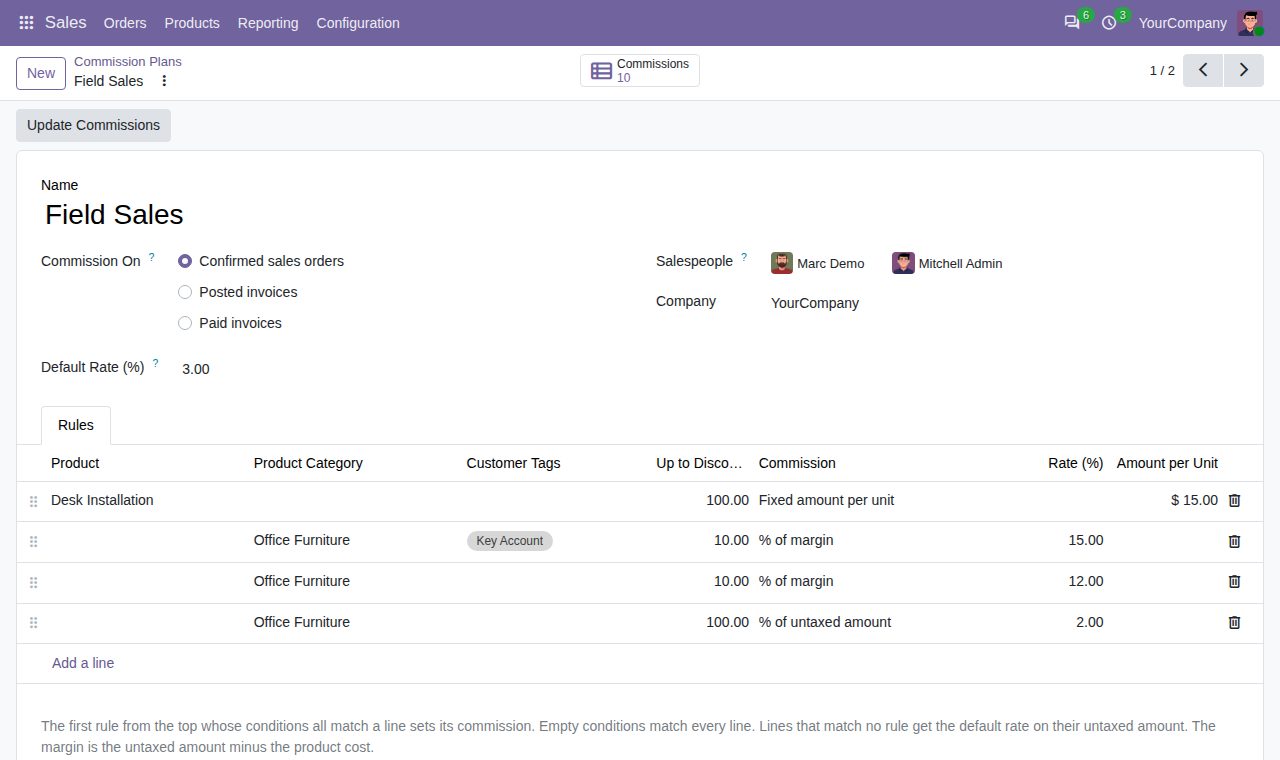
Per plan: when a sales order is confirmed, when a customer invoice is posted, or when a customer invoice is paid in full. Partly paid invoices earn nothing yet; undoing a payment takes the commission back until the invoice is paid again.
Rules in a fixed order; the first one whose conditions all match a line sets its commission. Conditions: a product (all its variants), a product category with its subcategories, customer tags (of the customer's company), and a highest line discount. Lines that match no rule get the plan's default rate.
A rule pays a percentage of the untaxed amount, a percentage of the margin (untaxed amount minus the product cost, so a sale below cost lowers the commission) or a fixed amount per unit sold, counted in the product's unit.
Cancelling an order, setting it back to quotation, changing quantities or prices on a confirmed order, resetting an invoice to draft, cancelling it or changing its salesperson updates the commission at once. Credit notes count negative; on the paid basis, once their invoice is paid or once they are paid themselves.
When a document changes after its commission was billed, the billed lines stay as they are and a correction line takes the difference, so the next bill settles it.
Select open commissions and click Create Vendor Bills: one draft bill per salesperson, made out to their contact, with the total on a Sales Commission product without taxes. Totals of zero or less stay open. Cancel or delete a bill and its commission is open again.
Orders and invoices in other currencies are converted to the company currency. Commissions has list, pivot and graph views with filters for To Bill, Billed and Corrections, and grouping by salesperson, plan, customer, status and month.
Plan changes apply to documents from then on. Update Commissions calculates again every confirmed order and posted invoice from a chosen day, for example after a rate change in the current month.
Salespeople see their own commission lines; Sales administrators and Billing users see all of them. Only Sales administrators manage plans, and only Billing users create bills. A salesperson can be on one active plan per company.
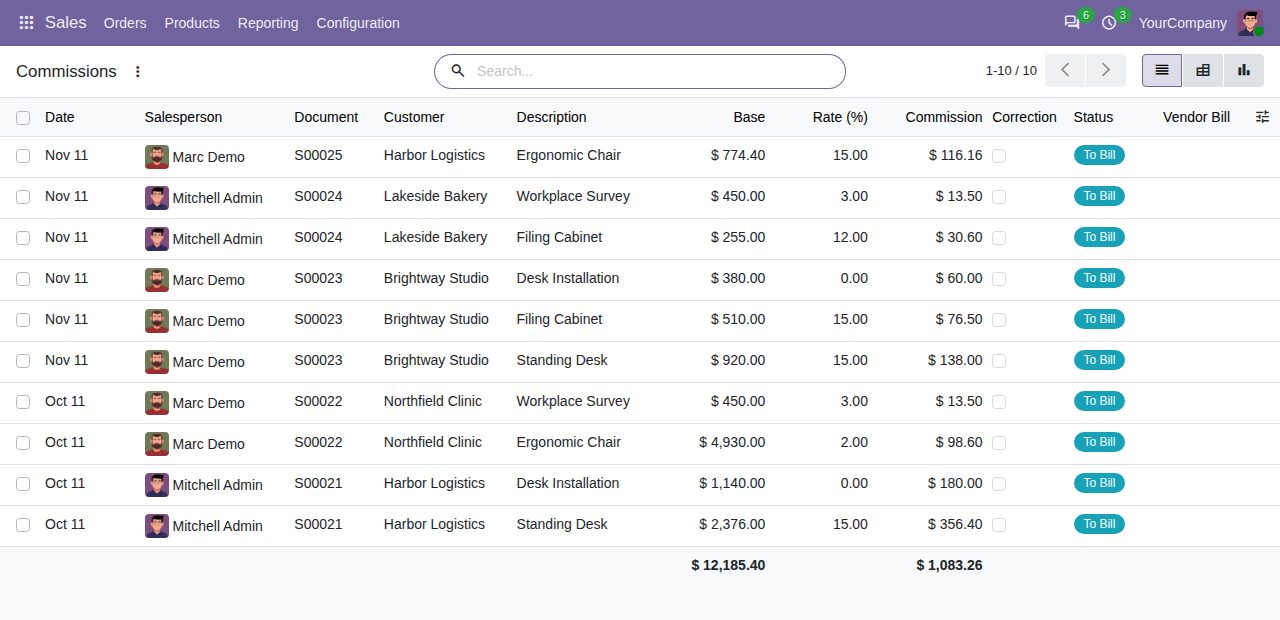
Commission lines per order line with base, rate, commission and status
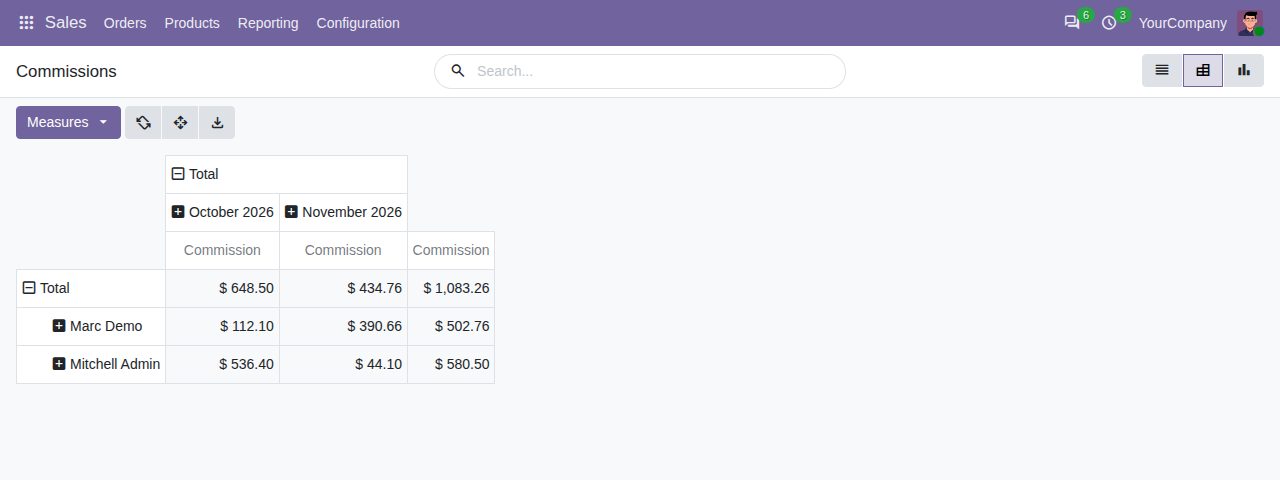
Commission per salesperson and month in the pivot view
We build custom Odoo modules and changes to this one at a fixed price, from €950 excluding VAT. Small modules are usually delivered within five working days, tested on your Odoo version. Describe what you need to hello@bizzkitt.ai.
Bitwerf is a trade name of BizzKitt B.V., Frederikstraat 67, 3034 LD Rotterdam, the Netherlands (KvK 42149345, VAT NL869932354B01). Questions: hello@bizzkitt.ai · Support · Privacy · Terms